For the lunchbox. For the snack shelf.
Small print.
Everyday choices.
Packing lunchboxes or picking a snack for yourself? Scan a barcode to explore the available ingredients and nutrition, and compare your favourites. Make choices that work for you and your family.
- Barcode scanning is free and unlimited, forever
- No ads, no brand money
- Works without an account
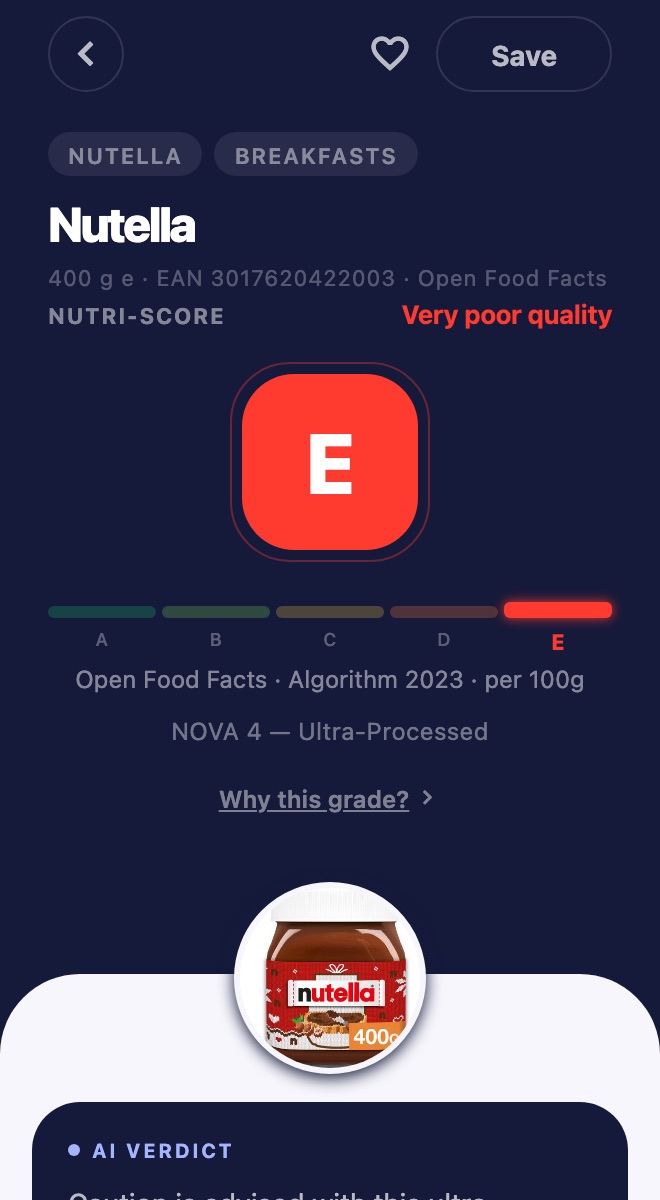
Nutri-Score grade plus NOVA processing group, on every result.
No dead end
No barcode match?
No dead end.
Plenty of products — deli counter items, homemade-style bakes, imports — never make it into a barcode database. Prova can analyse a label photo when you choose that path.
Photograph the front and back of the label.
Prova reads the ingredients and nutrition table.
Review the extracted grade, breakdown and allergen flags, then check them against the pack.
Label reads use an AI model and are included every month — see the support page for details.
Features
Everything you need to understand packaged food
Grades, available ingredients and flags from the connected product data — no sign-up required. Always verify allergens on the physical label.
Instant barcode scan
Point your camera at a product barcode and get the available result from our connected food databases. Free and unlimited, always.
No barcode? Snap the label
When a product isn’t in the database, photograph the label instead — Prova attempts to read it when analysis succeeds.
Nutri-Score & NOVA
European nutrition grade A–E plus the NOVA processing group, side by side, so you can compare products at a glance.
Ingredient & additive analysis
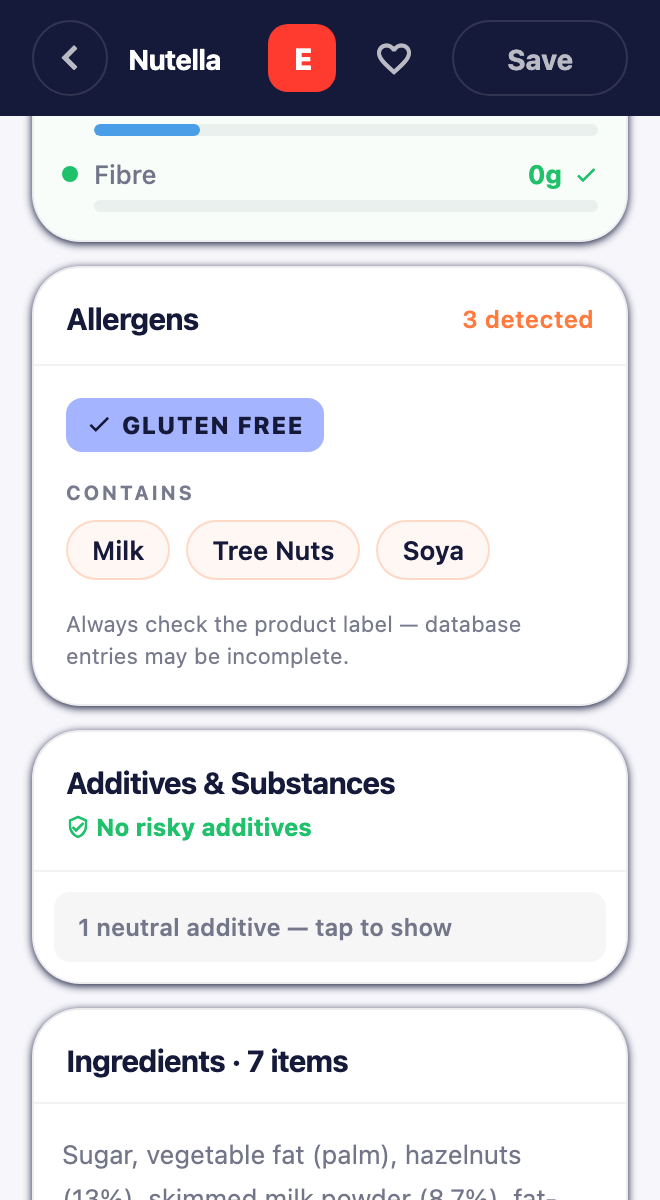
Each ingredient is flagged Safe, Caution or Avoid, with links to published sources where available.
All 14 regulated allergens
Choose any of the 14 EU-regulated allergens — they cover the US big nine too — and every result says plainly whether a product contains one, may contain it, or has no allergen data at all. Always confirm on the label.
Healthier alternatives
See better-scoring products in the same category when the available data includes suitable alternatives.
History & monthly recap
Every scan is saved on your device. Filter by grade, star favorites, compare two products side by side, and see your month in food in a recap you can share.
Personal profile
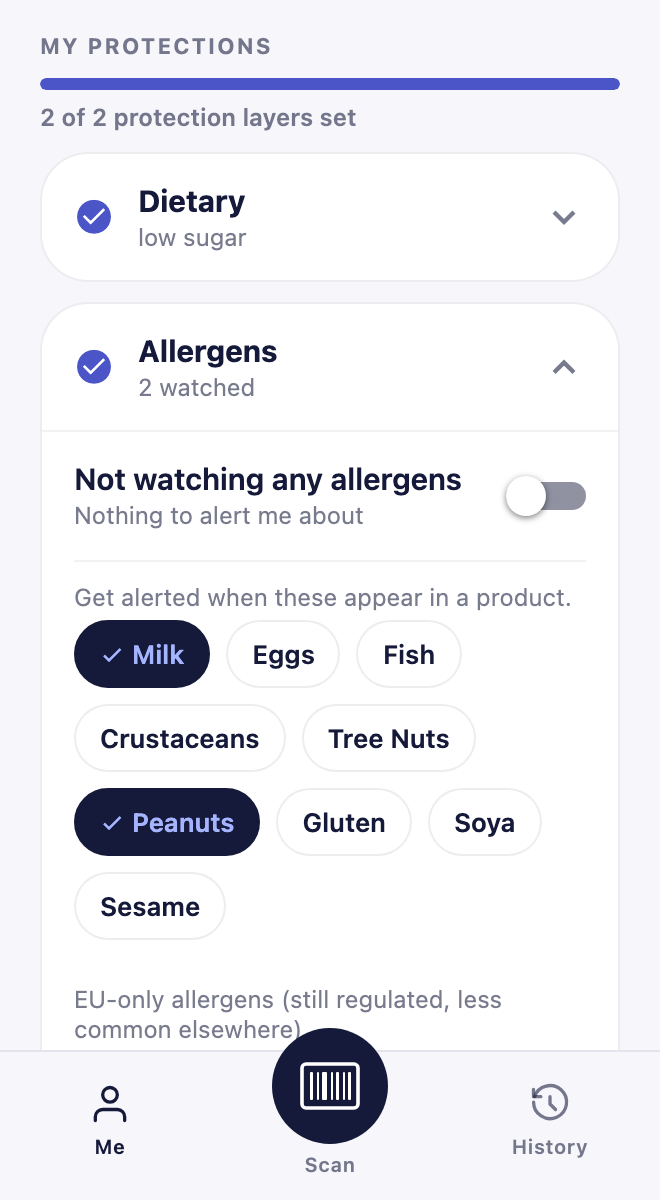
Set your allergens and diet once — vegan, vegetarian, low sugar, low salt, avoid ultra-processed — and results are checked against them. Your profile is stored on your phone; barcode lookups contact our backend.
Share a verdict
One tap turns any result into a share card with the grade and the reasons. Friends who tap the link land on the product in Prova, or on a page to get it.
Report a problem
Wrong product, outdated ingredients, odd grade? Report it in two taps from the result. For ingredient errors, photograph the label to fix the record on the spot.
Back up & restore
Export your history, favorites and profile to a single file you keep — AirDrop it, save it to Files, email it — and restore it on a new phone. No account needed.
Made to be readable
System dark mode, respect for Reduce Motion, large accessibility text without clipped grades, and a "Why this grade" explanation one tap from every verdict.
Personalisation
Built around your diet
Pick your allergens and diet once and results are checked against them. Prova tells contains apart from may contain, and says so plainly when a product has no allergen data. Your profile is stored on your phone; barcode lookups contact our backend.
Independence
Nobody pays for a grade.
No ads, ever. No paid placement, sponsored products or brand money.
Manufacturers cannot pay to improve a grade or appear among the alternatives.
Product data comes from Open Food Facts and other open sources. Prova is an information tool, not medical advice.
Privacy
Your data stays yours
No account
Prova is fully usable without signing up or logging in.
On-device history & profile
Your scan history and profile stay on your phone, not on a server.
Photos, only if you choose
Label photos upload only when you tap "Identify with photos." Back-label photos are processed for extraction; a front-label photo may remain as shared product-reference data. Scheduled cleanup removes stored photos after 90 days once they are no longer in use. Analytics is off by default.
Read the full privacy policy.
How it works
Three steps, zero hassle
No account. No subscription. Just open the app and scan.
Scan the barcode
Open Prova, point at the barcode on any packaged food. No match? Snap a photo of the label instead.
Read the result
Review the available Nutri-Score, ingredient breakdown, allergen flags and healthier alternatives.
Decide for yourself
Compare grades and ingredient flags, then choose based on your own needs. Prova is an information tool — not a doctor or dietitian.
Learn
Understand what you're reading
Short, honest explainers behind every grade and label term Prova shows you.
What the Nutri-Score A–E grade means
How the score is computed, what it doesn't measure, and why two products with the same grade can differ.
Read more →NOVA processing groups 1–4, explained
What "ultra-processed" is and isn't, with everyday examples for each of the four groups.
Read more →The 14 regulated allergens
The EU list, the US "big nine" overlap, and the hard rule that the physical label always wins.
Read more →FAQ
Questions people ask
Is Prova free?
Barcode scanning, grades, ingredient breakdowns and healthier alternatives are free and unlimited, forever. Label-photo analysis is included every month; details are on the support page.
Do I need an account?
No. Prova works fully without an account. History, favorites and your profile are stored on your device, and you can back them up to a file whenever you like.
What happens when a barcode isn't found?
Photograph the front and back of the label instead. Prova attempts to read the ingredients and nutrition table; check the extracted information against the package.
Is this medical or dietary advice?
No. Prova is an informational tool, not medical advice. Always check the physical label, especially for allergens, and talk to a professional about your diet.
Where does the data come from, and can it be wrong?
Product data comes from Open Food Facts and other open sources, plus label photos when you submit them. Community-sourced data can be incomplete or outdated, so the label always wins.
Is there an iPhone app?
Yes — Prova is on the App Store for iPhone and on Google Play for Android. Barcode scanning is free and unlimited on both.
How is Prova different from other food scanners?
No ads and no brand money influence a grade. No dead ends: when there's no barcode match, a label photo still gets you a verdict. Your profile and history stay on your device; barcode lookups contact our backend, and label photos leave the device only when you choose photo analysis.
Get started
Start scanning today
Free to download. No account needed. Your history and profile stay on your device; barcode lookups contact our backend.
 Scan to get Prova on your phone